Mkdir Command In Hindi | #mkdir | Linux Directory Commands | Linux Command | Class #5
watch video first
👇
Now let's learn how to create your own directory with the help of command prompt.
The mkdir stands for 'make directory'. With the help of mkdir command, you can create a new directory wherever you want in your system. Just type "mkdir <dir name> , in place of <dir name> type the name of new directory, you want to create and then press enter.
Syntax:
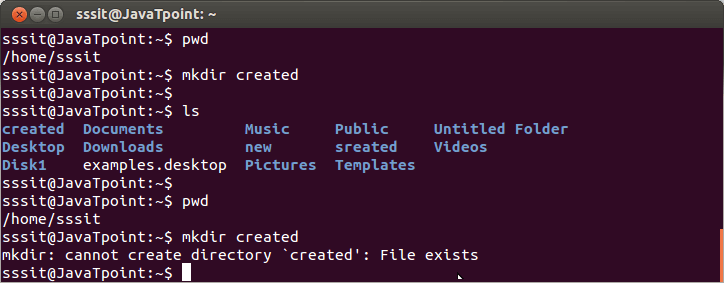
In above example, I am in /home/sssit directory. I have made a directory 'created' by passing command "mkdir created".
Now if i'll try to create a new file with the same file name 'created' that technically already exists, I'll get an error message.
Note: If you will not provide a path then by default your file will be created in your current directory only. If you want to create your directory some where else, then provide the path of your destination directory and your file will be created there
Please Share this course
TweetIt Looks like you have completed your course!! We have created Online series based on the above content. You can give a test and check your skill.
Be a Part of CollegeSpike by giving your precious comment here and help us in improving our content.
Self-assessment module
